Account Settings Guide
As covered in our previous guides, we’ve already explored other settings. Now, we’ll focus on the settings located on your profile. We’ll walk you through each one and explain what it does.
How to access your global account settings?
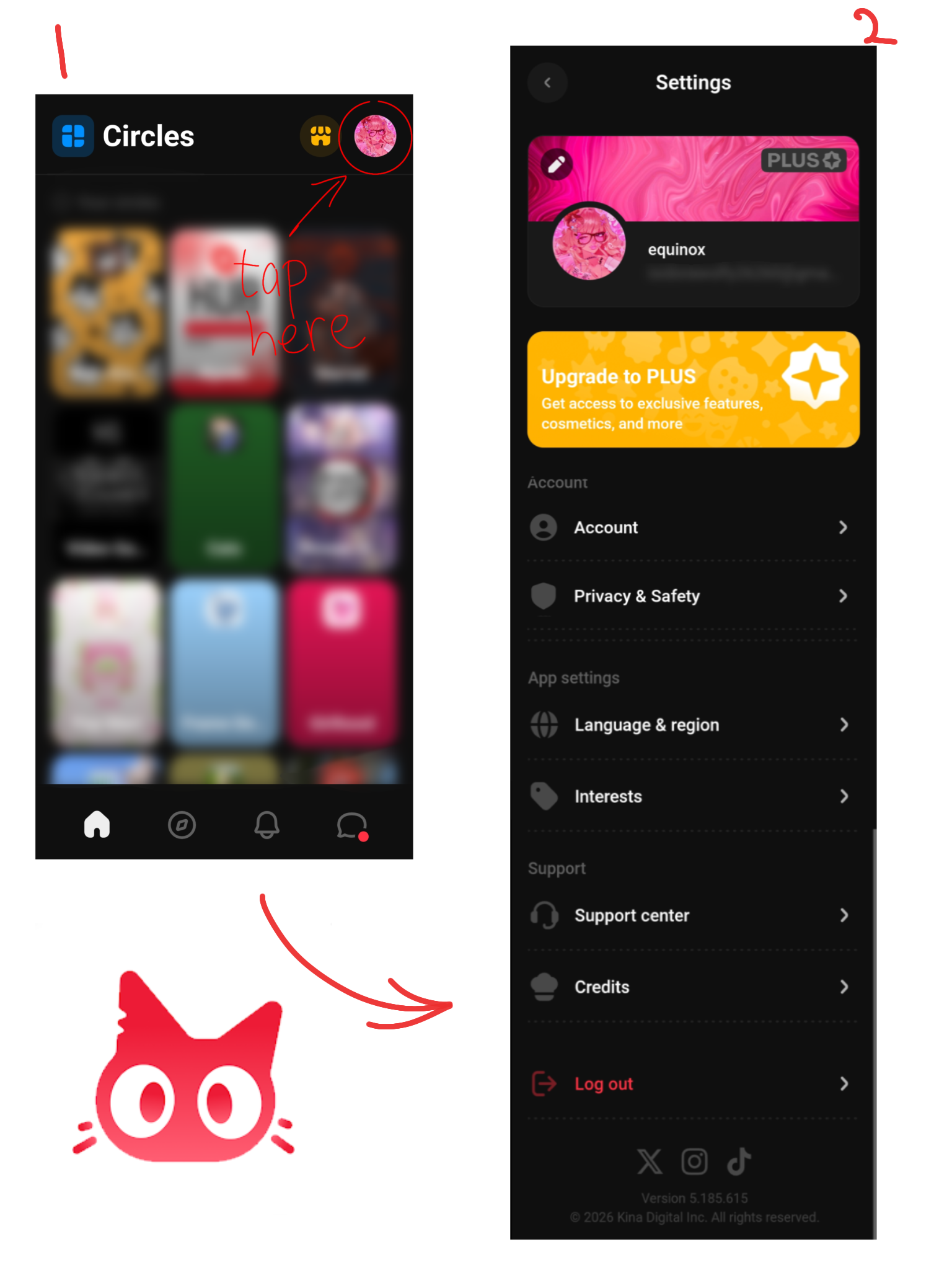
Click on your profile icon on your Kyodo home page to access your global account settings.
Profile Customization
The first thing you’ll see on this page is your profile customization options. By clicking the small pencil icon in the top-left corner, you’ll open a new page where you can customize your banner, icon, frame, display name, and bio. Kyodo+ users can also change the background and foreground colors.
Account Settings
Under this category, you’ll find the following options:
- Account
- Privacy & Safety
Account settings, as the name suggests, are used to manage your account. This includes:
Username
Display name
Email
Changing your password
Deleting your account
Privacy & Safety includes the following:
Blocked Users
Here, you can view the profiles of users you’ve previously blocked.
Support
This option takes you directly to the Support page, where you can contact our team regarding any issues (such as bugs, account problems, or reporting inactive owners).
Privacy Policy
This will direct you to our Privacy Policy, which explains how PossiblyCute Inc. collects, uses, and discloses your information when you access or use our services, including our mobile applications and Kyodo.
App Settings
App settings let you personalize your experience. This includes:
Language & Region
Interests
Language changes the language your app is written in, whereas the Region affects which circles you're going to see.
Here is a list of the currently supported language and regions you can change between:
English
French
German
Portuguese
Spanish
Russian
Arabic
Interests option lets you customize the types of circles you're more likely to see. For example, picking an “Art” tag will show you more circles with the same tag.
Insert image 3
Support
Support
This option takes you directly to our Support Helpdesk page, where you can contact our team regarding any issues (such as account problems, bugs, or reporting an inactive circle owner). You can also browse important articles there, including topics like events and circle features.
Credits
This is the credits page, dedicated as a “thank you” to our hardworking founding team, team Kyodo, Kyodo volunteers, artists, and design contributors.
Credits to @Equinox on Kyodo
.
Was this article helpful?
That’s Great!
Thank you for your feedback
Sorry! We couldn't be helpful
Thank you for your feedback
Feedback sent
We appreciate your effort and will try to fix the article