Kyodo V2 Is Here! Introducing Markdown Text Formatting
Hello everyone! We’re excited to announce that Kyodo V2 is now officially released. Along with this update comes a big improvement to how text formatting works on Kyodo.
What’s New?
Text formatting on Kyodo has been completely upgraded to a basic Markdown-based system. This new format gives users more flexibility and control over how their content looks, making posts clearer, more expressive, and easier to read.
Where Can You Use Markdown?
Markdown formatting is now supported across the following:
Articles- Wikis
- Personas
- Chatroom Description
- Chat Messages
- Profile Bios
The markdown system is not fully available on threads, as threads are meant to be short and informal. Only the basic markdowns are available.
Getting Started
To help you adjust to this change, we’ve listed some of the most commonly used Markdown formatting options below. These tools will allow you to add emphasis, structure, and style to your text with ease. If you need more help, we have linked a resource page for you to further understand the markdown system.
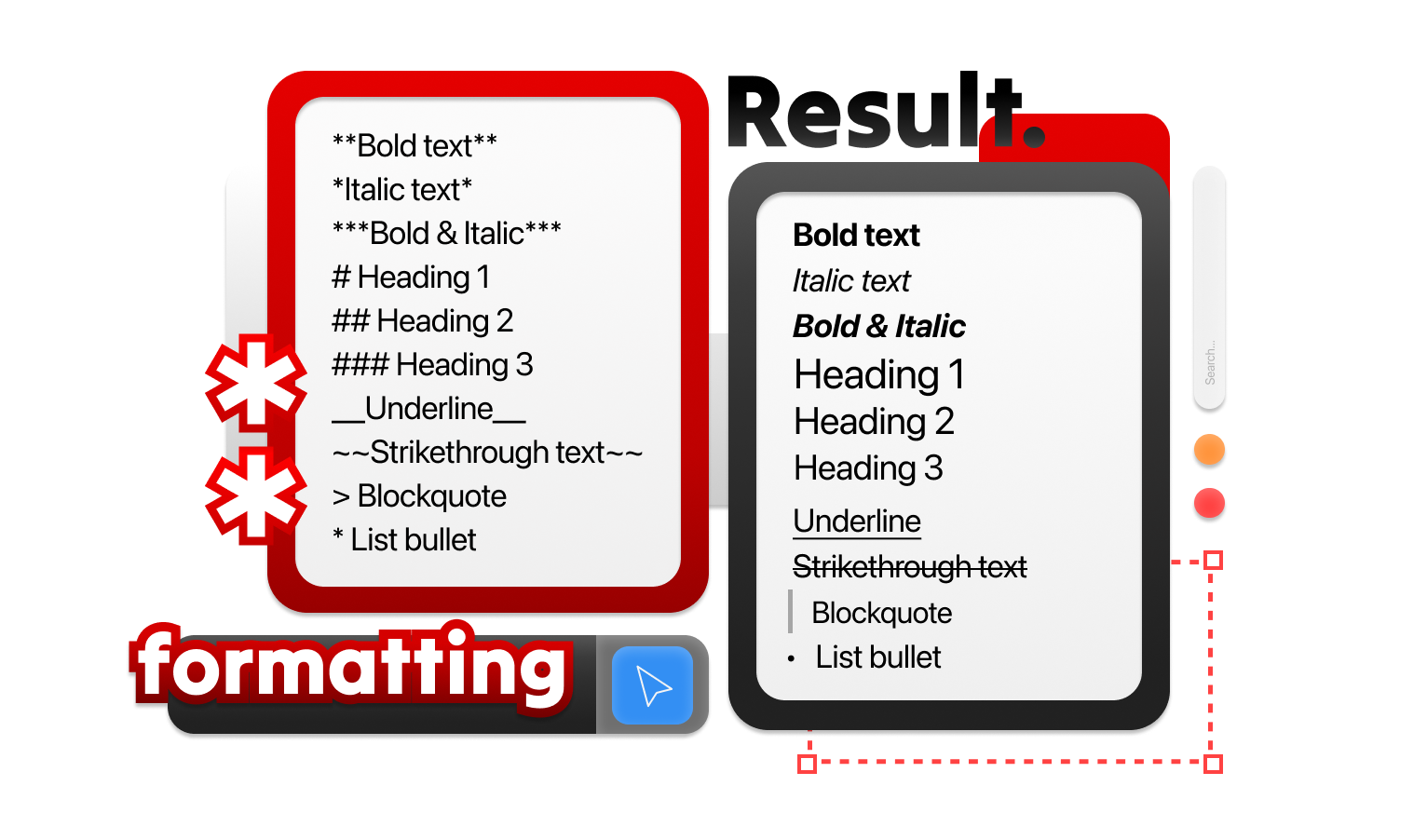
Image credit to @hartseer on Kyodo
Was this article helpful?
That’s Great!
Thank you for your feedback
Sorry! We couldn't be helpful
Thank you for your feedback
Feedback sent
We appreciate your effort and will try to fix the article